How to launch a WhatsApp assistant for your existing app
If your team already has an app, user accounts, APIs, and a real workflow to support, you do not need to build a separate bot backend from scratch. You need one managed agent layer that can work behind your app and continue the same experience on WhatsApp.
Start with the app you already have
The teams that move fastest with assistants usually do not start from zero. They already have user accounts, app workflows, business logic, and APIs. The question is not how to create a brand-new AI product. The question is how to add an agent backend to the product they already run.
That is the job General Augment is designed for. Your app keeps the experience, user relationship, auth, billing, and source of truth. General Augment runs the agent turns, memory, tool execution, identity linking, messaging delivery, guardrails, and observability.
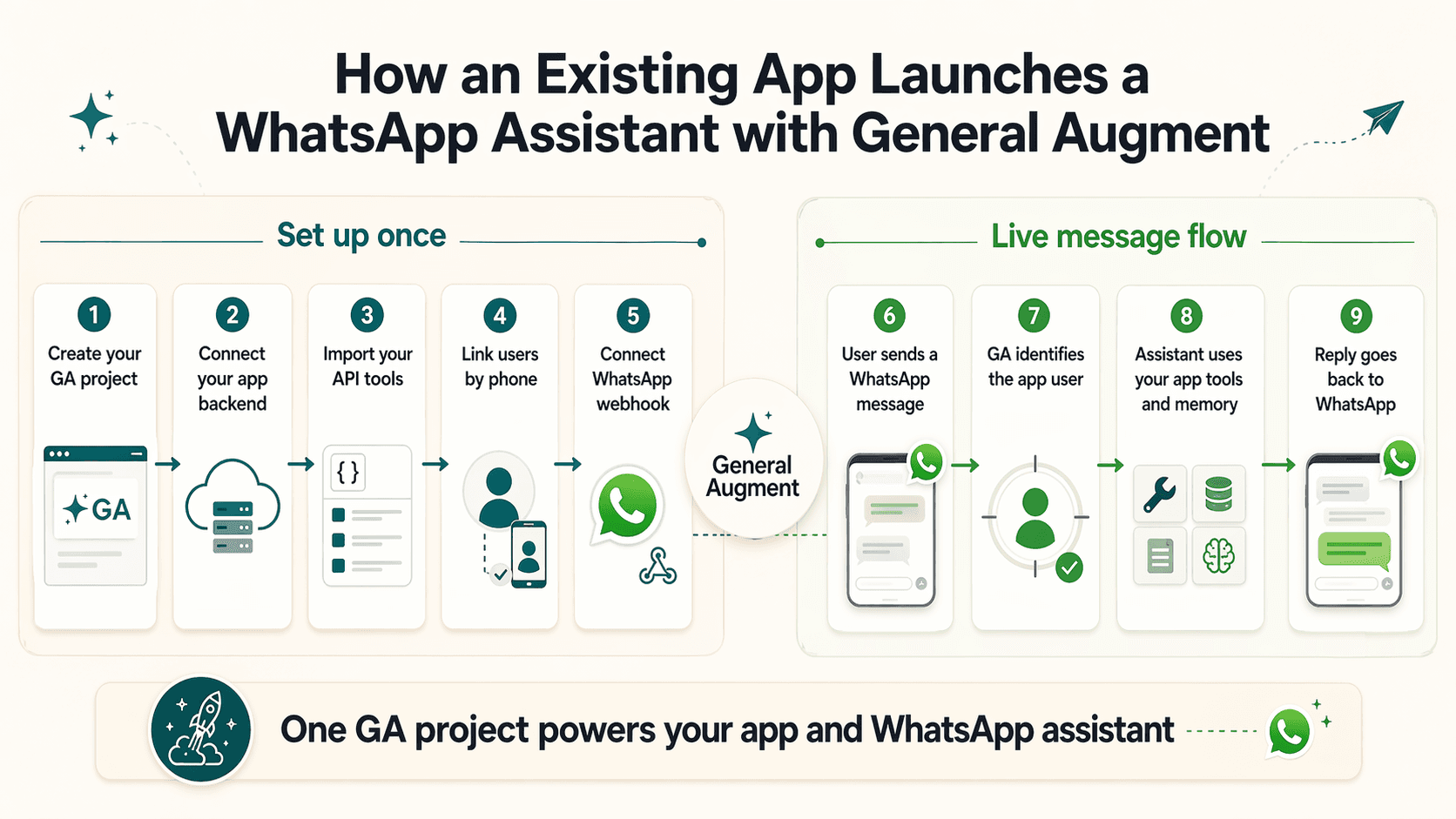
1. Create one project for the app
The cleanest model is one General Augment project for the product you are adding the assistant to. That project becomes the shared home for the assistant's instructions, tools, memory policy, usage limits, and channels.
This is what lets the same assistant support in-app chat, backend calls, and WhatsApp without drifting into separate configurations.
2. Connect your backend first
Before you worry about channels, prove the backend path. Your app backend sends one request to General Augment, passing a stable app user id and the user's latest message. This gives you the safest place to verify the assistant behavior before real channel traffic arrives.
Once that works, you already have the core assistant path. WhatsApp becomes a new delivery surface on top of the same project, not a new system.
3. Import the APIs the assistant should use
An assistant becomes useful when it can do more than answer questions. For an existing app, that usually means letting the assistant read or act through the same APIs your product already has. General Augment can turn those APIs into governed tools so the assistant can work with real app logic instead of relying on prompt text alone.
That keeps the assistant anchored to the product you actually run and reduces the risk of the assistant sounding disconnected from the rest of your app.
4. Link phone numbers back to app users
Identity linking answers a simple but critical question: who is this WhatsApp user inside my app? If the assistant needs to fetch account-specific data, take action on behalf of a customer, or personalize responses using the app's user model, that mapping matters.
You can add that mapping from your app when a user saves their phone number, or guide the user through a verification step later. Either way, the goal is the same: when a message arrives on WhatsApp, the assistant should be able to resolve it back to the right app user.
5. Connect WhatsApp to the same project
After the backend and identity path are in place, connect your Meta WhatsApp setup to the same General Augment project. That project stores the WhatsApp number mapping and receives inbound channel events through the shared webhook path.
This is the part many teams overcomplicate. You do not need a separate assistant configuration for WhatsApp. You need the same project to understand one more surface.
What happens when a user sends a WhatsApp message
A live message flow looks like this: the user sends a WhatsApp message, General Augment receives it, resolves the right project from the connected WhatsApp number, links the phone number to the app user when available, runs the shared assistant with tools and memory, records the result, and sends the reply back over WhatsApp.
That means your app chat and your WhatsApp assistant are not drifting apart. They are both backed by the same instructions, tools, policies, and identity model.
Why one project beats a separate bot stack
The common fallback is to build a second system for messaging. That usually creates duplicate logic, duplicate identity, and duplicate observability. The app knows one thing. The bot knows another. Then the team spends time keeping them in sync.
With General Augment, one project can power your backend path, your in-app chat, and your WhatsApp assistant. That keeps the assistant consistent and makes the operational model much simpler.
What to launch first
The best launch order is usually:
- 1. Prove one backend request with a stable app user id.
- 2. Add the first product APIs as tools.
- 3. Validate identity linking for the users who need account-aware actions.
- 4. Connect WhatsApp and test the end-to-end live message flow.
That path gives you working value quickly while keeping the architecture clean enough to expand later.
FAQ
Do I need to rebuild my app around AI?
No. The point is to keep your app and add the agent backend behind it.
Do I need a separate WhatsApp bot backend?
Not if you use the shared project model. The same General Augment project can back both your app and your WhatsApp assistant.
Can the same assistant work in-app and on WhatsApp?
Yes. That is one of the core product benefits. One project can support `/v1/responses`, in-app chat, and WhatsApp.
When should I add identity linking?
Add it when the assistant needs to access account-specific app data or actions on behalf of a real user. If the assistant is only answering general questions, you can start without it.