Connect your app once. Launch one assistant across your app and WhatsApp.
General Augment sits behind your existing app. Start with onePOST /v1/responsescall, then add tools, memory, approvals, observability, identity linking, and channel delivery so the same assistant can answer in-app or continue on WhatsApp.
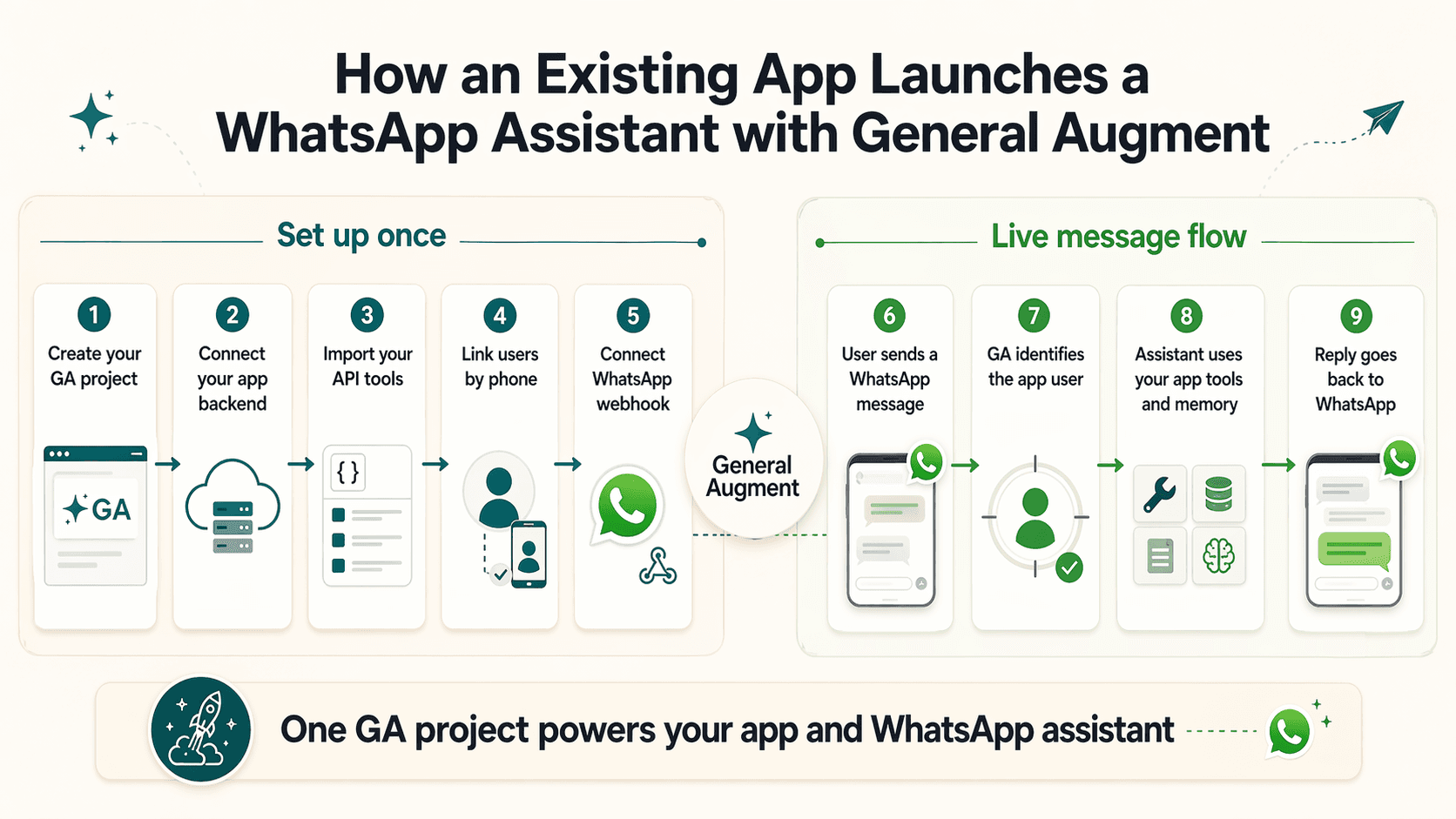
Your team continues to own the customer experience and product logic.
- Your product UI and brand
- Your app backend and APIs
- Your signed-in users and billing
- Your source of truth and workflows
General Augment becomes the agent layer around that product.
- Agent turns and memory
- Tools, approvals, and guardrails
- Identity linking across channels
- WhatsApp delivery, observability, and usage
The onboarding path for an existing app
Create one General Augment project for the app
Start with a single General Augment project that represents your existing product and its assistant.
Connect your backend to /v1/responses
Your app backend sends user requests to General Augment so the same agent can support in-app chat and future channels.
Import your APIs as tools
Turn the parts of your product the assistant should use into governed tools, starting with OpenAPI or built-in capabilities.
Link phone numbers back to app users
Map a WhatsApp user to the right app account so the assistant can act on behalf of the right person.
Connect the WhatsApp webhook
Attach your Meta WhatsApp number to the same project so the assistant can receive and send messages on that channel.
What happens after launch
After setup, the same project handles the full WhatsApp conversation path. A user messages on WhatsApp, General Augment resolves the right app context, runs the shared assistant with tools and memory, and sends the reply back through the channel.
Start by proving one backend call to /v1/responses with a stable user id. Then add tools, then identity linking, then WhatsApp delivery.
A user sends a WhatsApp message
The message reaches General Augment through the shared WhatsApp webhook.
General Augment identifies the app user
General Augment resolves the phone number to the linked app account when that mapping exists.
The assistant uses tools and memory
The same project agent applies memory, policies, approvals, and your app tools before it responds.
The reply goes back to WhatsApp
General Augment records the turn, tracks usage, and delivers the response back over WhatsApp.
Better than bolting on a separate bot stack
You do not have to build and maintain one stack for your app and another for WhatsApp.
The same user can be understood in-app and on WhatsApp instead of being split across disconnected systems.
Tools, memory, approvals, usage, traces, and channel activity stay in one managed project.
Use one agent project across your app, tools, and WhatsApp assistant
If you want the longer SEO-style walkthrough, the blog version tells the same story with more narrative detail and launch guidance.